
The promise of a display platform usually looks simple: you connect a repository, declare some variables, choose a domain and press * Deloy *. The code becomes available without handwriting the docker build sequence, proxy and certificate configuration. That comfort’s real. What’s changing between alternatives is who’s responding when the server, database or network stops functioning.
Coolify offers an experience similar to that of a PaaS about monitoring servers. It reduces repetitive publishing work but does not turn an own machine into a service run by a third party. The value of Coolify isn’t to remove the operation but to separate an appropriate monitoring interface from an infrastructure whose safety, capacity and recovery remains an operator’s responsibility.
Below we have an analysis of Coolify v4, the main monitoring routes and the boundaries to be defined before hosting an application. The documentation consulted corresponds to the stable line v4 and the last published release verified for this review was v4.7.5, del 10 de noviembre de 2026. Architecture material for v5 should not be confused with the conduct of this version.
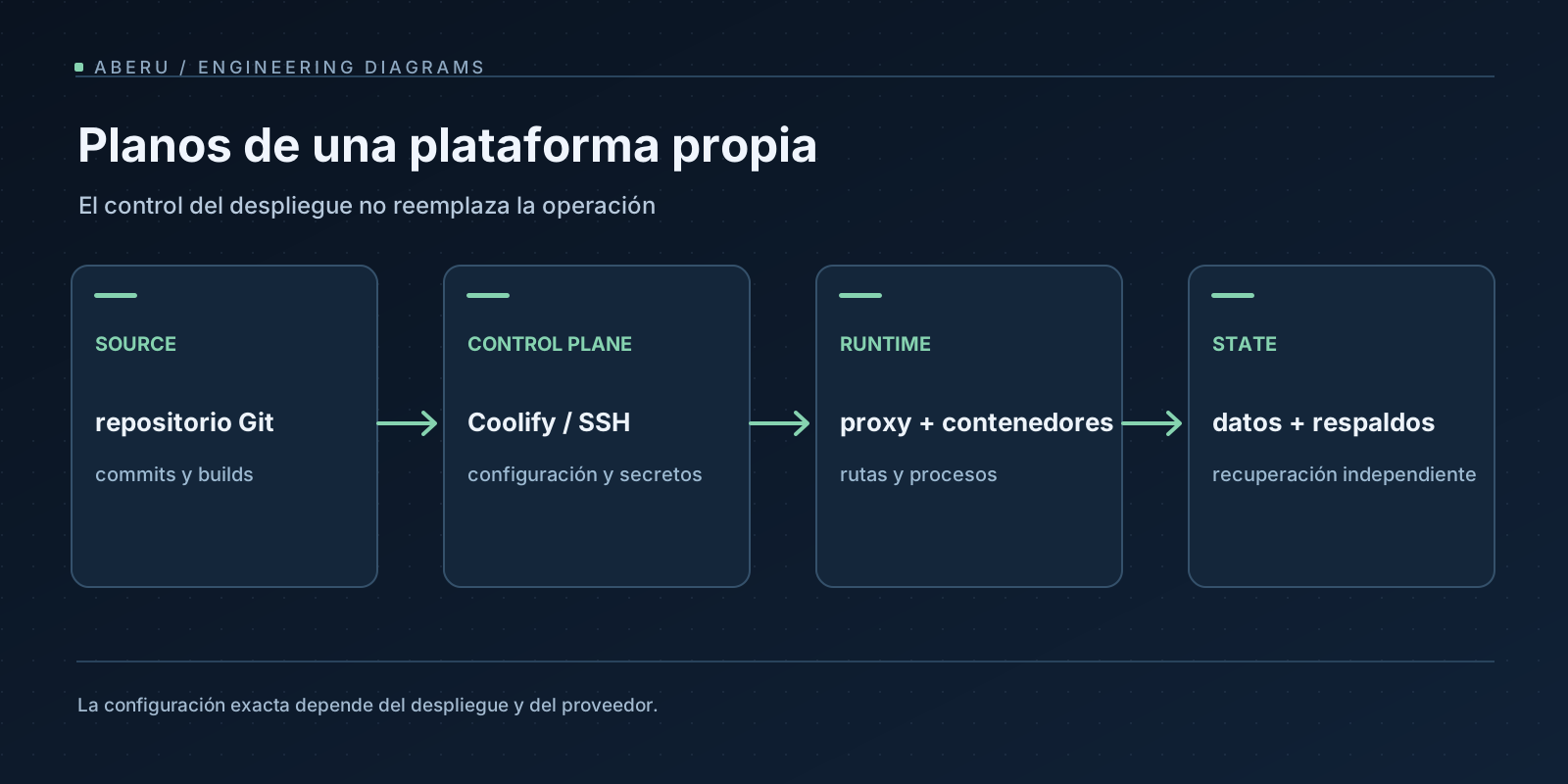
What you gain by operating an own PaaS
The original attractiveness to publish each service manually is valid: a centralized monitoring of projects, domains, deployments and Docker resources can sustain a heterogeneous set of applications. A project can use Node.js, Python, Elixir or an image compiled elsewhere without requiring a dedicated performance platform for each language.
But that flexibility has a second face. The same machine can concentrate several services with different consumption and risk profiles. If a container fills the disc, a database removes memory or proxy gets an invalid configuration, the effect can reach resources that have no relation to the original display.
That’s why it’s more necessary to think about Coolify as a monitoring plane about Docker, but not as a substitute for an operating system, backups or observability. The arquitectura oficial distinguishes Coolify’s instance, connected servers, containers and proxy from each destination.
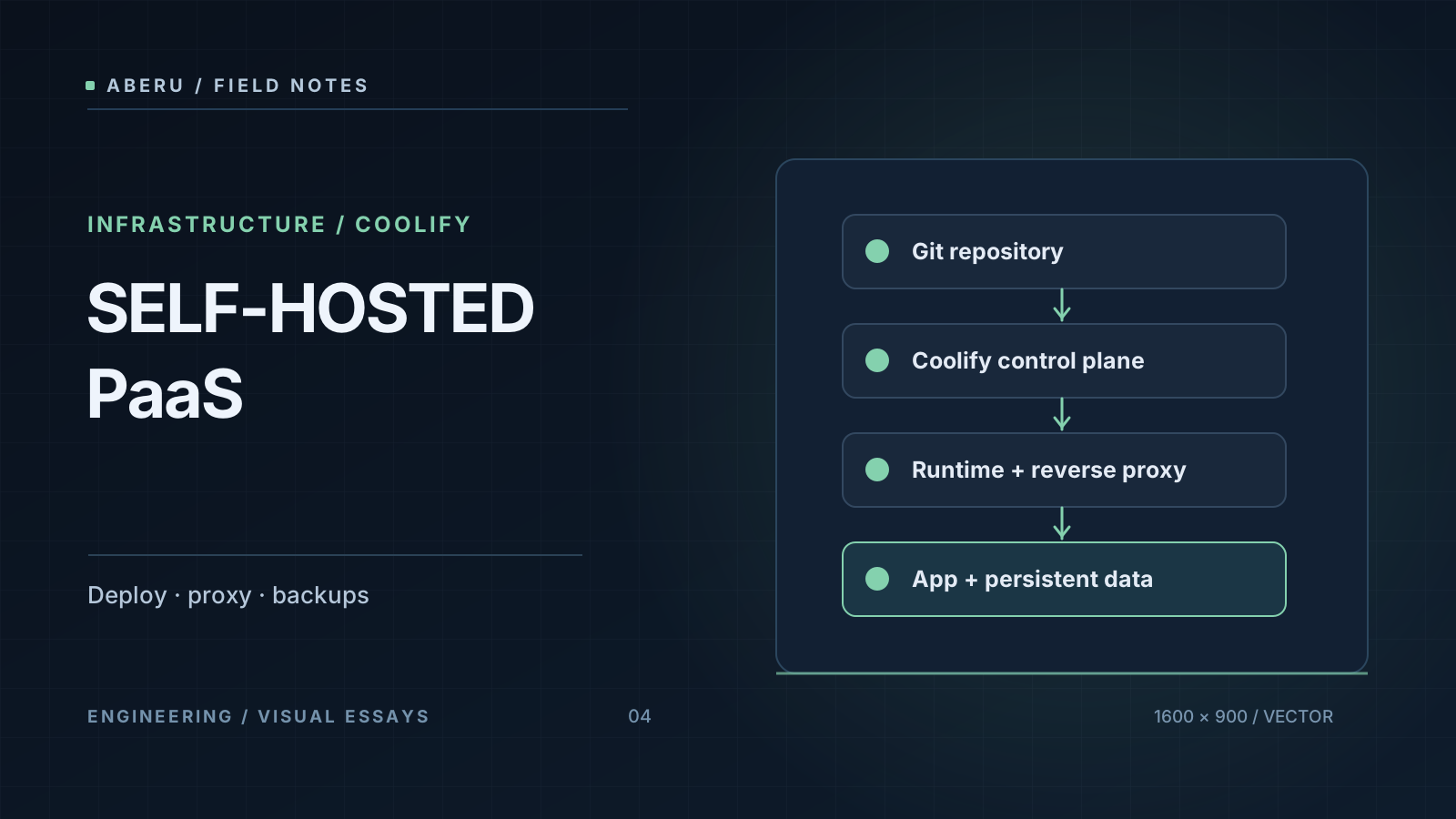
Four pieces and an operational border
Control plate. The dashboard, API and automation mechanisms get and process them through matching jobs. Servers. Coolify connects to SSH hosts to conduct necessary operations. ** Resources. ♪ ♪ Applications, databases and services are run as Docker resources about dedicated servers. Proxy.
That division explain an important conduct: if the Coolify dashboard ceases to be available, existing applications can continue to serve traffic as long as the server, proxy, containers and network remains healthy. That doesn’t remove the incident: without the monitoring plane, the ability to deploy and manage from its interface may be limited. They’re not the same fault plane.
Coolify documenta several mechanisms to reach a container and run:
| Source or method | What’s up? | When does that make sense |
|---|---|---|
| Git Repository + Nixpacks, Railpack (beta) or Static | Coolify prepares a built from code | Without Docker’s own prescription projects with building and their changes |
| Git + Dockerfile | It’s built as defined in the repository | The image and its dependencies require explicit monitoring |
| Docker Composition | The definition of several services applies | Coupled service topologists, assuming their upgrade rules |
| Dockerfile or Composite set up in Coolify | The definition lies with the platform | Prototypes or configurations run outside the repository |
| Prebuilt image in a register | Unloaded and run by tag or digest SHA-256, without remodel source | CI produces a revised device that should be promoted intact |
Here’s a particularly common confusion: Nixpacks isn’t Nix and cesv. It’s a strategy to build images from code while Nix and cesv manage inputs and declarative tools. That a display uses Nixpacks does not mean that it shares the model of devenv.lock as explained in nuestro artículo sobre entornos reproducibles.
The path of a request: DNS, proxy and internal port
Suppose an API that you listen to at 8080 port inside of the container. The user visits https://api.example.com, a name reserved here as a documentary example, but not as a real server. A number of independent layers have to be met to achieve implementation:
- DNS resolves to the public IP of the resource server, but to a magic abstraction called “Coolify.”
- The firewall and supplier’s rules allow required connections, normally 80 and 443 for proxy.
- The proxy recognizes the domain and sends back to the application using the relevant Docker network.
- The destination port set up at Coolify coincides with the port where the process hears in the container.
- The application responds with the semantics that the client expects.
By default, Coolify v4 uses Traefik as an integrated proxy and Caddy as an alternative. The custom or disabled proxy option moves complete liability for TLS and routing to the operator. To change global proxy settings deserves a check window because an error can affect all public server applications.
A https:// URL allows Coolify to manage certificates when the integrated path supports that automation. But automatic TLS does not fix broken DNS and blocked ports. To directly publish a host port can avoid domain routing and for a regular web API should not be the first option. The guía de dominios distinguishes these responsibilities.
Continuous example: Replaceable API and PostgreSQL with status
Consider a simple learning architecture: an HTTP API with /health and a PostgreSQL managed as separate database resource. The application doesn’t store persistent files in your container and the base isn’t published online. The API will be built outside the production server by means of CI and delivered to Coolify as a sign image identified by digest.
It’s a design proposal, not a display made for this article. The mechanisms available have been verified but have not been a functional combination with an actual application and credentials.
Build: Do not rebuild the device in every environment
The service repository keeps the code, the language lockfile and a revised build definition. If Dockerfile is used, setting a digest base and monitoring the package manager reduces changing inputs. No determinist turn the build by itself: they also have scripts, watch, network, tools and architecture. A stronger alternative for traceability is to let CI publish an artifact and send to Coolify his registration reference by digest.
That separates two questions that are usually mixed up: “What version did we build?” and “What environment did we run?.” The first should be decided before production. The documentación de imágenes existentes confirms the unbuilt display from a digest. The provenance and verification of images require additional controls and an SHA-256 does not secure an absence of vulnerabilities.
Runtime: environment variables without translating secrets into photo layers
An API may require DATABASE_URL, LOG_LEVEL and an internal port. Each value should be classified as necessary. Coolify differentiates variables used in build and run time and new values can be applied to both areas if their range remains unchanged. A password that only needs the process ** should have been entered as an argument for building or printed into login.
DATABASE_URL would be set up as a midtime secret by means of a private reference to the database without showing actual connection chains here. Non-secret variables may belong to the versioned display configuration and sensitive variables require appropriate storage and permissions. Coolify documenta integrations with outside managers and warns that login editing is best worked out, not a leaking guarantee.
Status: A database isn’t another disposable container
For PostgreSQL, storage location and backup policy are part of architecture. A persistent volume survives regular replacements of the container but isn’t a backup. If you lose your server disk, a local volume can be lost with it. Also, a local volume doesn’t become shared storage just by logging more servers.
The API should be replaceable and the base, administered with migration, backups and a recovery plan. In this example, the base would be accessible by private network of the destination, without posting the PostgreSQL port to the Internet. Multiserver variants require an explicit persistency design as documentación de almacenamiento does not promise to share volumes between hosts.
Dish health isn’t business health
A /health endpoint can say that the process is ready to get connections and does not prove that orders are properly recorded, that the base responds under load or that an outside service is available. It aims to offer a low-cost and clear performance readiness sign without changing data.
The configuración de health checks has relevant sutiletes: an HTTP check set up from Coolify runs inside the container and requires curl or wget in the final image. If both Dockerfile and dashboard are defined, dashboard settings can replace that of the image. To compose, the check corresponds to each service in definition and not to the same standard application screen.
In the requested v4 documentation, the HTTP checks generated are based on the tool’s output code and some expected response fields of IU are currently not used as a condition. That’s why we shouldn’t confuse “there’s a field that says HTTP 200” with “that code’s valid exactly” without inspecting actual implementation. The readiness observed from Docker also doesn’t replace an outside test by passing DNS, TLS, proxy and application.
Change a version: rolling, rollback and its boundaries
Coolify can conduct * rolling * replacements for some types of application - for example Dockerfile and existing images - as long as the conditions of display are met. That flow tries to overlap containers and uses health signs before withdrawing the previous one. No guaranteed zero downtime: depends on application, startup, shortup and configuration. Also, posting fixed ports to host or other customization can prevent that mechanism.
A Docker Composer application is updated with Compose reconciliation and the same replacement guarantees should not be assumed automatically. These differences are explained in the guía de rolling updates.
A reversion of an application is also tighter than suggested by the word * rollback *: it can restore an earlier image held but does not release migrations, changes in volumes and effects on external APIs. Indeed, the documentación de rollbacks indicates that the recovered image runs with the current run time configuration. For an incompatible migration from PostgreSQL, back to the previous container can leave service worse and better.
The defence is to design compatible migration where possible, preserve earlier artifacts and distinguish rollback from data recovery **. The procedure should be followed with an appropriate data copy and a measured recovery window before a delicate change.
3 different copies that should not be confused
There are at least three areas with independent backup needs:
| What’s his back? | What’s his use? | That doesn’t get back by itself |
|---|---|---|
| Coolify instance: monitoring and configuration database | Reaping projects, adjustments and resource references | PostgreSQL data from persistent apps or files |
| Application database: consistent copies and zo | Recovery of PostgreSQL’s logical status | The whole infrastructure and all the service archives |
| Volumes / application files | Recovery of persistent content outside the base | The configuration and keys of the monitoring plane |
Los backups de instancia protect Coolify’s monitoring base, no all workloads. To recover cipher settings it may be necessary to preserve the original APP_KEY and to treat SSH keys separately and these data require a secure copies outside of the machine to be retrieved. The guía de restauración details this.
Los backups de bases de datos allows them to generate and send them to configured storage, including a remote one as appropriate. A job marked as successful does not atprove that the file can be restored. The operational recommendation is to program restoration tests and to check that the resultant application and outline versions are usable. If the only backup resides on the same server, a bug from that server can remove service and copies simultaneously.
The daily operation doesn’t end by pressing Deploy
Coolify offers states, logs, health information, notifications and optional metric using Sentinel. Even so, the propio producto distingue integrated indicators of an external system of complete observability. For an important service we require information from outside: domain availability, TLS expiry, critical flows, disc saturation, application errors and login retention.
In terms of security, the distribution isn’t ambiguous. Coolify provides dashboard authentication, access controls, certificate automation and credit management options. The operator keeps liability for SO and Docker updates, SSH access, firewall, permission, images, dependencies and endpoints of the application. It is necessary to activate 2FA at the console, to restrict the range of the keys and to avoid displaying administrative panels if they can be restricted by network. Check out modelo de seguridad.
To update the Coolify instance does not magically update his applications. Version notes, prior copies and after upgrade service monitoring are still necessary. Automation saves manual actions and does not replace the responsibility to review its consequences.
The actual cost: infrastructure and operational work
The potential economic advantage of self-hosting is monitoring infrastructure and grouping loads with known requirements. The disadvantage is that the invoice will no longer be contained in a single platform fee. A fair comparison should add up:
** Server and network + public IP + discs and remote storage + domains and potential border services + monitoring and retention of login + operation and incident response time. ♪ ♪
The Coolify self-hosted software does not require a platform license; Coolify Cloud is a different service that manages the monitoring plane while loads are still on user-supplied servers. Even so, the absence of a license fee does not turn hosting into free and does not turn operating costs to zero.
I do not reproduce here figures from a particular server or a personal monthly comparison with Vercel that cannot be documented with invoices, resources and equivalent period. The amounts vary by region, tax, storage and traffic. To evaluate a real case we have to add these concepts and decide what levels of availability and recovery are required. A small VPS can cover installation minimum and cannot be suitable for an application with intense peaks or critical data.
When to select and delegate the operation
Coolify makes sense when the computer already includes Docker, SSH, DNS and backups, wants to control location or performance costs, and prefers a unique interface for heterogeneous projects. It can be especially useful for internal environments, persistent prototypes and moderate loads with an acceptable operational complexity.
Instead, a managed PaaS can be preferable if an organization does not wish to operate systems, does not have incident guards or requires data and availability services supported by specific contracts. The comparison isn’t “Coolify better than Vercel,” but what part of complexity should be automated and what part should be delegated.
The connection with a reproducible pipeline is also deliberate. First the artifact is built and verified and then its performance by digest, domain, variables and status is set up. Coolify can handle the second part but does not automatically convert to reducible the first. And neither of them substitutes for outside copies, host security or restoration tests.
** The maturity measure isn’t how many copies you do with a click, but if you know what version you’re running, how you detect a bug and how you get back to service without confusing containers with data. ♪ ♪

