
A receipt printer seems like a simple peripheral until a ñ appears converted into another symbol, the logo is cut off, the drawer opens twice or a retry generates two receipts. The difficulty of ESC/POS is not learning three bytes: it is controlling the border between document, encoder, transport and physical state of the device.
In this article we analyze the family of ESC/POS commands with reference to the documentación oficial de Epson. The focus is driver design and operational recovery for POS. It is not assumed that all 58 or 80 mm equipment supports the same functions. The proposed laboratory is conceptual and the hardware cases are pending execution. The compatibility of a sequence depends on manufacturer, model, firmware, interface and configuration.
ESC/POS is not equivalent to a single universal specification
ESC/POS is a family of commands used by receipt printers. A combination of bytes can express “align center,” “print a QR symbol,” or “query status.” But even when two devices claim to be compatible, their command sets, parameters, character tables, graph modes, and states may differ.
The matriz de impresoras compatibles de Epson shows which commands each model applies. Manufacturers such as Star and Bixolon also publish their own specifications. Therefore, there is no sufficient basis for the statement “ESC @, GS V and all QR codes work on any thermal printer.” Capacity must be checked or tested for the specific model.
| Layer | Compatibility question | Example |
|---|---|---|
| Command | Does it exist in this model and firmware? | GS V for cutting, GS ( k for QR |
| Parameters | What ranges and variants do you accept? | QR module size, cutting type |
| Coding | Which page is selected with each n? | ESC t n and CP858/CP850 |
| Transport | Is there a status reading channel? | USB, TCP raw, OS spooler/driver |
| Physical state | Did you cut, print and have paper? | Sensors, cutter, print buffer |
Separating these layers allows you to version a device profile and avoid a class with hundreds of conditional exceptions scattered around.
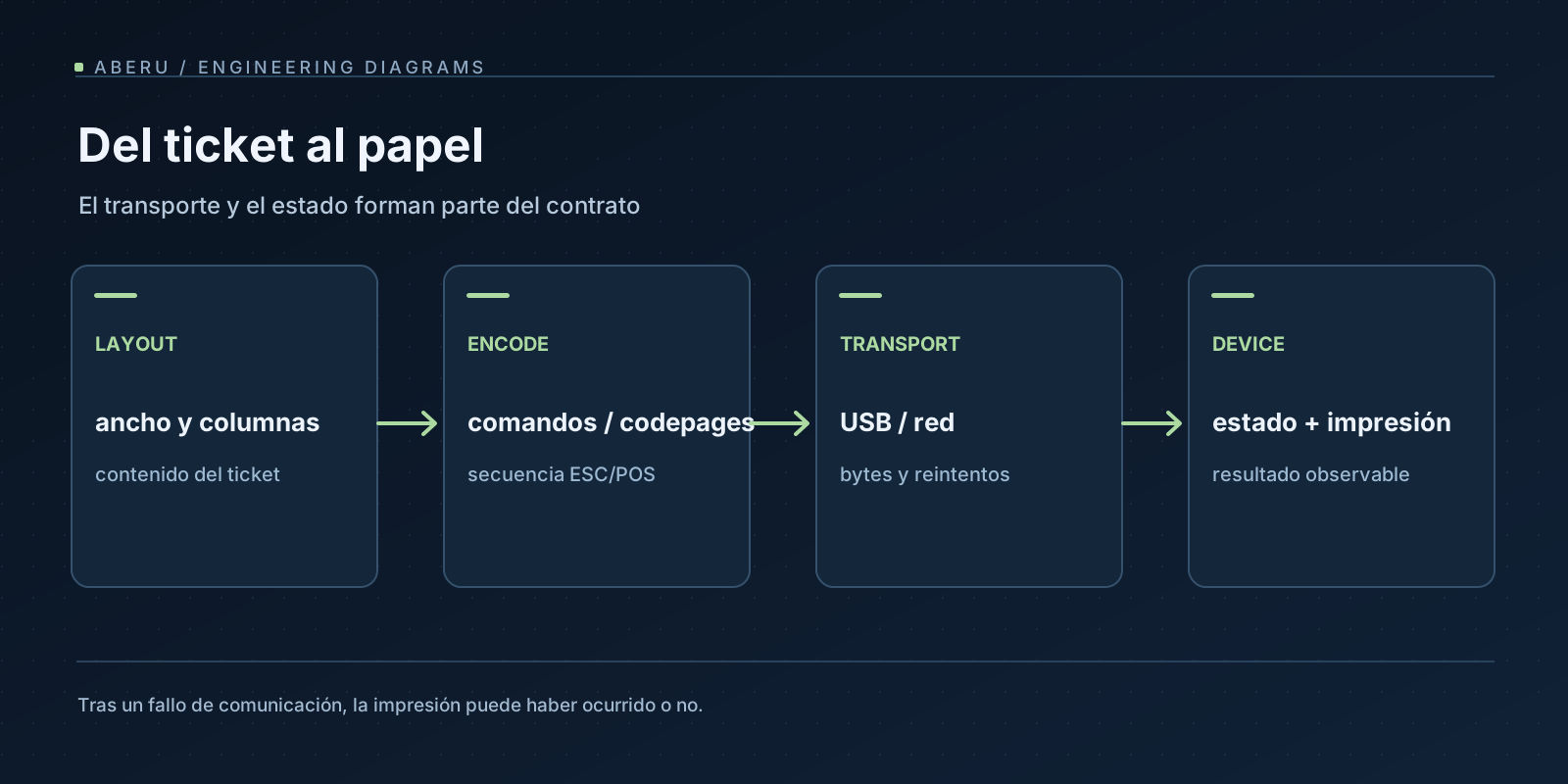
The ticket pipeline: from data to bytes
A ticket usually starts as a domain structure: identifier, sales lines, quantities, taxes, currency, and a footer. At this stage there should be no ESC/POS commands or manual cutting of strings according to the fixed number of characters. Then come layout, encoding and transport.
Venta confirmada / número de documento
       ↓
Modelo de ticket (datos tipados, importes y orden de líneas)
       ↓
Layout (ancho imprimible, columnas, estilos y desbordes)
       ↓
Encoder por perfil (code page, QR, imagen, comandos soportados)
       ↓
Payload de bytes inmutable + checksum/hash
       ↓
Transport adapter (USB, TCP, spooler) + observación de estado
       ↓
Job ledger (resultado confirmado, fallido o ambiguo)
This is important: a successful write() on a socket can mean that the operating system accepted bytes, not that the printer converted them to paper. It is also not equivalent to a transaction commit in the application that created the order. Maintaining a unique job identifier is more useful than just recording “print success.”
Spanish characters: ESC t does not activate UTF-8
The original code in this article showed ESC t 16 followed by text.encode('utf-8'). That combination was conceptually incorrect: ESC t n selects a character table, while UTF-8 is a multibyte encoding. A n value associated with CP858 on certain models does not automatically convert the device parser to a UTF-8 decoder.
The referencia ESC t de Epson specifies that the range of n and the corresponding table are model dependent. Even an available code page may not be selected with the same identifier on computers from different manufacturers.
Suppose model profile commits a table compatible with cp858 and knows its value n. Then the encoder could be:
from dataclasses import dataclass

ESC = b"\x1b"
GS = b"\x1d"

@dataclass(frozen=True)
class PrinterProfile:
    model: str
    codepage_number: int   # Valor verificado en documentación del equipo.
    python_codec: str      # Ej.: "cp858", NO implica soporte UTF-8.
    supports_cut: bool
    supports_qr: bool


def select_codepage_and_encode(profile: PrinterProfile, text: str) -> bytes:
    if not 0 <= profile.codepage_number <= 255:
        raise ValueError("Número de tabla ESC t fuera de rango")
    encoded = text.encode(profile.python_codec, errors="strict")
    return ESC + b"t" + bytes([profile.codepage_number]) + encoded
The deciding point is not guessing codepage_number=16. It is to check the correspondence between n and python_codec for a model/firmware and test characters like á é í ó ú ñ Ñ €. errors="strict" allows detecting unrepresentable letters instead of silently corrupting the receipt. For unsupported scripts and characters, some architectures convert the region to an image, provided the graphics profile allows it; This increases the size of the payload and requires measuring readability.
You also have to treat the physical width with care: an accented letter is not necessarily a byte in UTF-8, nor is a monospaced cell always equivalent to a width in millimeters. The format depends on font, double width mode, resolution and printable paper. A robust layout calculates measurements with the actual printer parameters.
QR: defined function, conditional compatibility
Epson uses functions from the GS ( k family to configure, store and render QR. The exact feature identifiers are important: select model (165), size (167), error correction (169), store bytes (180), and print (181). There is no single “universal QR sequence” that can be sent without consulting the model.
The following encoder illustrates the format for Epson devices that have confirmed support for those functions. It does not control USB/TCP or verify the physical result.
# Fragmento autocontenido para probar el formato de las funciones QR.
GS = b"\x1d"


def gs_k(body: bytes) -> bytes:
    n = len(body)
    if not 1 <= n <= 65535:
        raise ValueError("Longitud GS ( k fuera del rango de 16 bits")
    return GS + b"(k" + bytes([n & 0xFF, n >> 8]) + body


def encode_qr(data: bytes, *, module_size: int = 4) -> bytes:
    if not data:
        raise ValueError("El QR no puede estar vacío")
    if len(data) + 3 > 65535:
        raise ValueError("Contenido demasiado grande para este framing")
    if not 1 <= module_size <= 16:
        raise ValueError("Tamaño de módulo fuera del rango de este ejemplo")

    return b"".join((
        gs_k(b"\x31\x41\x32\x00"),                # Función 165: modelo 2
        gs_k(b"\x31\x43" + bytes([module_size])), # Función 167: tamaño
        gs_k(b"\x31\x45\x31"),                # Función 169: corrección M
        gs_k(b"\x31\x50\x30" + data),         # Función 180: datos
        gs_k(b"\x31\x51\x30"),                # Función 181: imprimir
    ))
QR length, size and model validations must conform to the range of the equipment; The values shown do not guarantee that all models support 16 as a module size. In a real driver, supports_qr and the limits are part of the profile. Binary content must be defined according to the document contract: a fiscal identifier, URL or QR can have its own encodings and requirements.
Before printing a QR in production, a paper test should verify that an independent reader accurately recovers the payload, even after resizing, printing in real thermal conditions, and approaching capacity limits. The fact that the command does not produce a write error does not prove that the symbol is readable.
Logos, images and the problem of the “obsolete”
Graphics printing supports different families of commands: raster bitmaps, graphics stored in device memory, NV variants, and newer commands. On lista de Epson, GS v 0 is marked obsolete. This does not mean that no current device accepts it; means that should not be presented as the only recommended method for new developments without contrasting the command matrix.
An image path must define, for each model: maximum width in points, conversion to monochrome/halftone, dithering, buffer limits, rotation, cropping and speed. Logos stored in NV memory have different provisioning and update requirements than images submitted in each ticket. Browser screenshots are not equivalent to binary output; You have to test both devices separately.
Designing the driver as render_logo(bitmap, capabilities) allows you to choose the strategy and log an acceptable degradation (for example, printing alternative text if graphics are missing), without coupling the POS logic to a particular opcode.
Court and status: do not confuse commands with confirmations
GS V selects cutting modes on models with a cutter and compatibility for the chosen parameter. The command itself does not certify that the cut has been completed. Similarly, DLE EOT can request certain statuses in real time, while GS a enables Automatic Status Back (ASB). The availability, semantics and reception of these signals depend on the model and interface.
The problem appears when unidirectional channels are mixed with bidirectional state protocols. An operating system print queue can accept the job and not transmit responses in the same way as a raw TCP connection. In other cases there are asynchronous ASB notifications that require a separate parser from the work stream. It should not be assumed that a call to status certifies the complete issuance of a particular receipt. The guía Epson de comandos explicitly distinguishes these families.
A compatibility table, dated by firmware, should identify whether the equipment offers:
| Ability | Driver decision | physical test |
|---|---|---|
ESC t | Page and number n set | Printing and reading ES characters |
QR GS ( k | Allowed functions and limits | Exact content scanning |
| Graphics | Raster/NV/graphics mode selected | Full logo, margins and contrast |
GS V | Cut enabled only if supported | Royal court in chosen mode |
DLE EOT, ASB | Per-interface state parser | Paper removed/cover open/reconnection according to manufacturer |
Tests should identify specific model and firmware, not just “80mm ESC/POS printer.”
The most difficult failure: the ambiguous result of a shipment
Let’s think about the following journey: the application accepts the payment, generates the receipt and starts writing bytes over TCP. The connection is dropped after sending. The customer knows that a transport error occurred, but does not know if the printer received all of it, part of it, or even printed at all. Automatic retry may produce a duplicate ticket; Failure to retry may leave the operator out of paper.
There is no automatic distributed transaction between sale.commit() and the thermal head. That is why it is convenient to model the work as an explicit state:
| State | What is known | Next action |
|---|---|---|
QUEUED | Payload fixed, not yet sent | Send once per policy |
SENDING | Attempt started | Record attempt and transport |
ACK_TRANSPORT | The channel/spooler accepted data, does not test printing | Wait for additional evidence if it exists |
CONFIRMED | Confirmation evidence defined by profile/operation | Close job, keep audit |
FAILED | Confirmed failure before delivery | Retry with controlled idempotence |
AMBIGUOUS | There may have been partial delivery/printing | Reconcile with reliable operator or signal; avoid silent duplication |
This state machine is a design proposal, not a native ESC/POS feature. In practice, CONFIRMED must be defined precisely: it may indicate an external operational observation and not a transactional acknowledgement from the printer.
A useful ledger stores job_id, document_number, model, transport, payload_sha256, timestamps, number of attempts, transport error and evidence of resolution. The full content of tickets with personal data should not be included in the logs. The visible document number helps distinguish an authorized reprint from an accidental duplicate.
Retries: API idempotency doesn’t mean exactly-once on paper
An API can reject two submissions of the same job_id; a queue can deduplicate requests; a worker can use a lock to avoid concurrency. They are valuable controls, but they do not reverse the uncertainty after a printer received bytes without a confirmation unambiguously linked to that job. If it is decided to reprint, the UI should show that it is a reprint and record who authorized it, in accordance with applicable business and tax rules.
Recovery requires separately treating sales state, byte generation, job state, and physical state. Resolving the error by printing again without verifying the last two can multiply the problem.
Testability: separate encoder and transport
A driver designed as a pure function allows testing bytes without hardware. We can check the encoding, QR header and length limits before testing real printers:
# Extracto de tests del encoder (suponiendo importados los helpers anteriores).

def test_cp858_espaniol():
    profile = PrinterProfile("modelo-verificado", 16, "cp858", True, True)
    payload = select_codepage_and_encode(profile, "Niño €")
    assert payload[:3] == b"\x1b\x74\x10"
    assert payload[3:] == "Niño €".encode("cp858")


def test_qr_framing():
    payload = encode_qr(b"pedido-001", module_size=4)
    assert payload.startswith(b"\x1d\x28\x6b\x04\x00\x31\x41\x32\x00")
    assert b"\x31\x50\x30pedido-001" in payload
Attention: the value 16 appears here to verify the framing of the encoder, not to declare that all printers identify CP858 with that number. The actual compatibility test needs the documented profile and a physical impression.
The transport is tested with a fake that simulates partial writing, timeout and reconnection. This only validates our software policy; the physical result still requires hardware. We do not generate a fixed status sequence for any model here because its interpretation and reception mechanism vary by interface.
Acceptance protocol for real printers
Status: proposed, NOT EXECUTED in this revision. The environment is specified with manufacturer/model/firmware, interface, driver version, paper width, DPI and network configuration. A minimal matrix:
- Printing ASCII, accents,
ñ,Ñ,€and non-representable characters; record substitution or expected error. - 58/80 mm ticket with tables, amounts, fonts and margins; measure visual overflows without inferring them only from the string.
- QR with different module sizes, a known payload and return reading.
- Logo by supported graphics commands, dithering, alignment and NV persistence when it exists.
- Cutting: complete/partial only if the model allows it, with verification of physical end.
- Status: paper empty, cover open, disconnection and reconnection; indicate what is observed through actual transportation.
- Connection loss before/during/after sending: record when
FAILEDcan be marked and whenAMBIGUOUSshould be left. - Long sends, consecutive jobs and authorized retries; check that the ledger corresponds to the physical documents.
Status, hardware and disconnection tests are pending printer available. No invented results or percentages are presented. An encoder that passes unit tests can still fail against real buffers, firmware, and spooler mechanisms.
Integration with a POS, Odoo and Flutter
The application can be written in Python, Dart, JavaScript or any other language. The useful design is not to open a socket within the billing view. It is advisable to create a printing service that accepts a typed ticket, produces an immutable payload and delivers the result to a queue with recoverable states. The frontend needs to display QUEUED, AMBIGUOUS and CONFIRMED based on evidence, without automatically identifying “service HTTP 200” with “printed paper”.
In Odoo 18, the addon that defines the flow should keep the extensions in its own module, respect ACL/record rules and not modify core views or models. That extensibility frontier is developed in Odoo 18: herencia y seguridad.
For Flutter, if there is a proprietary print SDK, a plugin via Platform Channels or Pigeon may be appropriate; a pure binary encoder could remain in Dart. Native access is only justified by measured API, reliability or performance. On devices with system spoolers, the commit should still distinguish what the SDK reports from what happens on the physical mechanism.
Conclusion
The most costly mistake in ESC/POS is not mismemorizing an opcode: it is assuming that all models accept it, that UTF-8 is activated with ESC t, or that a completed write() certifies a physical ticket. A reliable driver maintains a capability profile per model, encodes verifiably, separates transport from result, and incorporates an ambiguous shipping state to recover without silent duplicates.
What should be tested first is the encoder; What must be checked later, in hardware, is everything that the encoder cannot observe.
Primary references
- Epson: ESC/POS Command Reference.
- Epson: comandos por modelo, ESC t, QR mediante GS ( k.
- Epson: listado de comandos y marcación de obsolescencia.

